How Merchant Recognition Works

One of the biggest pain points when adopting a new personal finance application is recategorizing all your transactions. We did not want users to have to start training a new system from an empty database.
That is why Big Picture Money ships with a separate merchants database. On day one, common payees can already resolve to a recognizable merchant and a sensible default category. Everything runs locally and you do not need to reach out to a web service to categorize transactions.
Our installer is actually very large because of this database. Its almost 300MB of data that is used to provide default categories for common merchants.
The goal of merchant recognition
Even in 2026, banks still send cryptic payee strings for every transaction. These strings look like this:
AMZN MKTP US*4X2R9
TST*SUNRISECAFE
TAMPA EMBASSY SUITES TAMPA
Sometimes they are easy and obvious to recognize, and sometimes they are obscure and cryptic.
The goal of recognition is to turn these cryptic strings into standardized merchants (Amazon, Sunrise Cafe, Embassy Suites) and assign them a default category with a match confidence.
Uncommon payees and local businesses (such as local restaurants) will still need a one-time manual category; but then that choice becomes a learned pattern for next time.
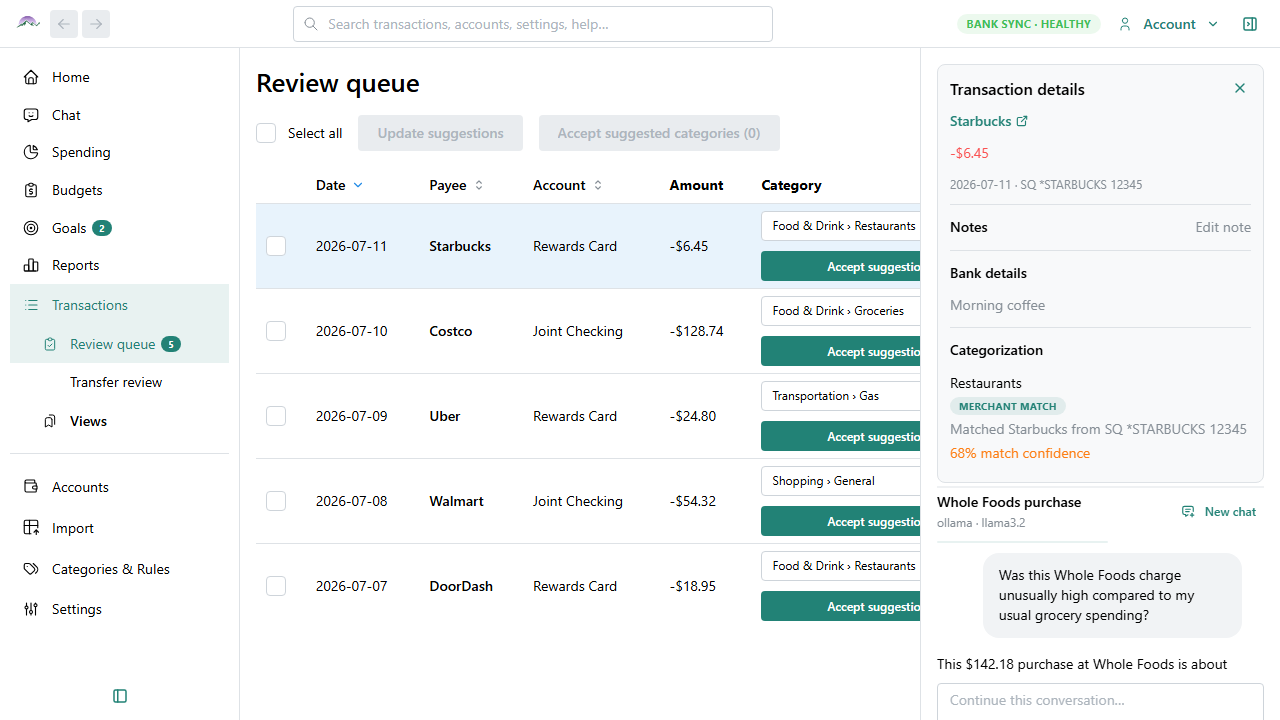
How recognition works on your machine
The app cleans the bank text, then extracts what we call a spine (yes, we played too much Mortal Kombat as kids): the core name hiding inside the rest of the payee name junk (city names, processor names, transaction codes, etc.) It tries many different ways to extract the spine, and assigns a score to each attempt, the highest score wins. This way EMBASSY SUITES can win even when the bank wrapped the city around it.
We take that spine and try to match it against records in the shipped merchants.db. If we get a hit, you see a friendly on-screen display name and a default category. This sort of recognition runs offline and is very fast.
Crowd contributed categorization data helps improve this merchants catalog for everyone. It is off by default, but we hope you turn it on. It is completely private -- raw merchant data strings are never sent to our servers. Instead, we send an unbreakable one-way hash of the normalized data as well as how you categorized it. So instead of sending AMZN MKTP US*4X2R9 categorized as Shopping, we send 98cea00268270f65136caf8768270c9a66ce5144a62277e61b380a6441d3fae0. That long string of digits is calculated on your computer and impossible for us to turn back into AMZN MKTP US*4X2R9, but we can use it to create categorization rules, because every user will turn that Amazon string into the exact same sequence of numbers.
We'll write more about how this data stays private in a future article, but for now we will also just add that we don't even associate these values with your user ID. There truly is no way to take these data from our servers and turn them back into an individual person's data. To read more about it today (before we write that future blog post), see Crowd contribution privacy documentation.
Where the catalog comes from
The merchants database that ships with the app is read-only. It never changes (this way we can download updates as the data changes without worrying about overwriting your changes.) Your overrides and patterns live in your own, personal, encrypted database; the merchants database is just starting data.
We build the catalog from several source datasets, including, but not limited to:
- OpenStreetMap places — identity: names, brands, and domains
- Company reported data — websites and domains that enrich identity
- Transaction datasets — aliases and weak category signals from real bank-style text
- MCC codes — a fallback table when a file includes a merchant category code (they are not the merchant's default category)
- Curated overrides — trusted chain and category fixes we maintain
- Crowd consensus — optional signals from people who opt in, including residual patterns that do not yet map to a known merchant
We bias toward precision: better to miss a rare local shop than invent a wrong alias. The longer engineering story of how those sources become one catalog is a later essay.
How you get the database
A complete install includes this merchants database. Auto-updates include supplemental data that will be used to improve matches.
Optional crowd improvements
During first-run setup — or later under Settings → General → Help improve categorization — you can opt in to help improve categorization for everyone. The switch stays off until you turn it on, but we hope you do. As we mentioned before, there is no privacy risk to you in turning it on.
When you contribute, your categorizations strengthen default categories in future merchant database updates. Patterns that already map to a known merchant update that merchant's default. Patterns that do not yet map to a merchant help other users create default categories for those merchants.
A stack of categorization gates
Merchant-database lookup is only one layer. How categorization actually works is worth its own future blog post. At a very high level, the categorization steps include:
- Your rules — patterns you define in the app
- Built-in transaction-type patterns — payroll, transfers, credit card payments, and similar
- Your learned patterns — categories you assigned manually, including ambiguous merchants (Walmart as groceries on some rows and shopping on others)
- On-device embedding neighbor — similarity to your past corrections
- Merchant database — spine and alias match, plus crowd-consensus records
- MCC — the merchant category code from the bank file
- On-device local classifier — a model trained from your history
Automation here is a stack of gates you can override. When you correct a suggestion, the next import can learn that choice locally.
For day-to-day detail, see Merchant recognition and Categorization precedence. Buy Now if you want to try it with your own history.